How to Play Solo
Solo is the default way to play Sorting History. Pick your categories, set your difficulty, and build your timeline at your own pace. Save mid-game and come back later if life interrupts.
Setting Up a Solo Game
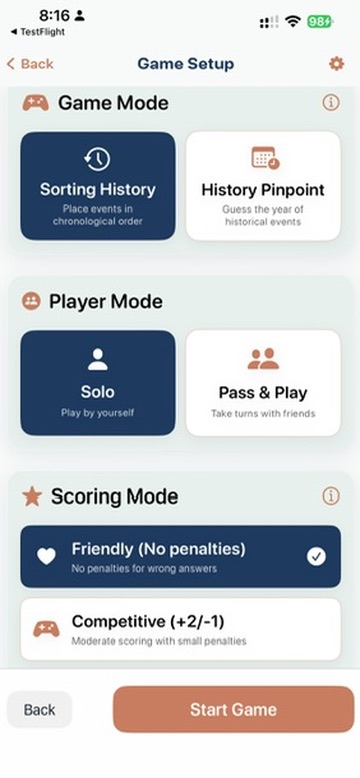
- Tap Play on the main menu.
- Choose your game mode:
- Sorting History — place events in chronological order on a timeline
- History Pinpoint — guess the exact year an event happened (Historian tier)
- Select Solo as your play type.
- Pick your categories. Choose one for a focused game or mix several for variety. Use presets like "Wars & Politics" or "Pop Culture" for quick setup, or save your own favorite combinations.
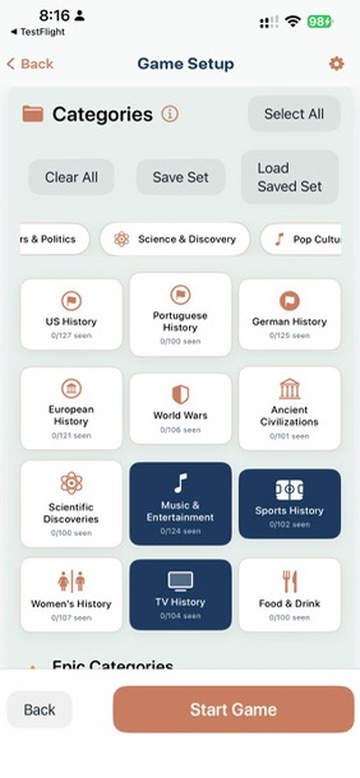
Select categories — mix and match for variety. - Set your scoring mode:
- Friendly — +2 for correct, no penalty for wrong. Great for learning.
- Competitive — +2 for correct, -1 for wrong. Balanced challenge.
- Expert — +3 for correct, -2 for wrong. Every placement matters.
- Toggle Year-Based Scoring (optional). ON by default — events in the same year are interchangeable. Turn it OFF for a harder challenge where same-year events must be in exact month order.
- Choose game length:
Length Rounds Time Sprint 5 ~3 min Normal 10 ~5 min Marathon 15 ~8 min Ultra Marathon 20 ~12 min Epic 30 ~18 min - Tap Start.
During the Game
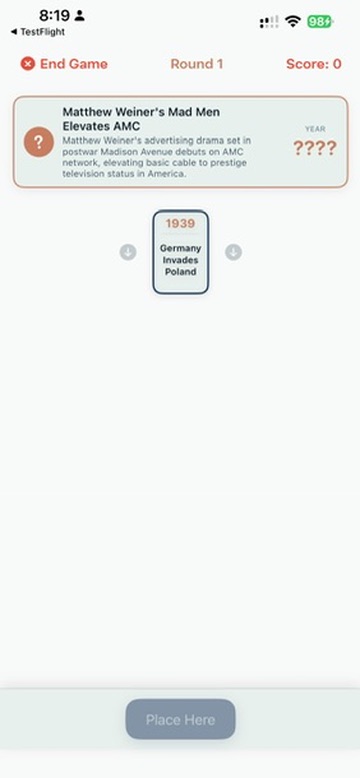
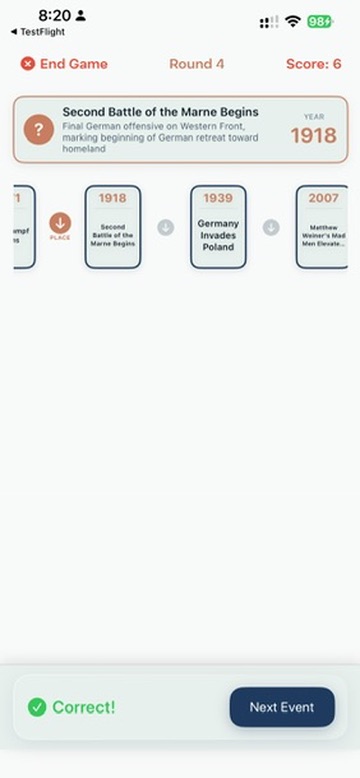
Each round, an event card appears with a title and description. Your job depends on the mode:
- Sorting History: Place the event in the correct position on the growing timeline — before, after, or between existing events based on when it happened. Two ways to place:
- Tap: Scroll the timeline left or right, tap an arrow to choose your position, then tap Place Here. Default on iPhone.
- Drag and Drop: Long-press the event card until it lifts, drag it into the gap that appears on the timeline, then release. Default on iPad. Switch anytime in Settings → Placement Method.
- History Pinpoint: Guess the year using intuitive swipe controls, the Earlier and Later buttons, or tap the year display to type directly. Use era chips to jump to broad time periods.
After each placement or guess, the game reveals the answer and shows whether you were right.
Save & Resume
Need to stop mid-game? Solo games save automatically. A Resume Game button appears on the main menu when you have a saved game. You'll pick up from the exact round where you left off.
After the Game
When all rounds are complete, the results screen shows:
- Your score — total points earned
- Accuracy — percentage of correct placements
- Letter grade — from S+ (best) to F
- Category and time taken
For details on how grades and scoring work, see Tips, Strategy, and Scoring.
Recommended First Game
If you've never played before:
- Mode: Sorting History
- Play type: Solo
- Category: One you know well (Music & Entertainment is a crowd favorite)
- Scoring: Friendly (no penalties)
- Length: Sprint (5 rounds, under 3 minutes)
This gives you a quick feel for the mechanic without any pressure. Once you're comfortable, try Competitive mode, longer games, or mix multiple categories.
More Guides
- How to Play Sorting History — the core timeline game
- How to Play the Daily Challenge — daily 5-event puzzle
- How to Play History Pinpoint — guess the exact year
- How to Play Pass & Play — one device, multiple teams
- How to Play Network Play — separate devices over WiFi
- Tips, Strategy, and Scoring
Ready to Sort History?
Sorting History is now available on the App Store with 12 categories, 1,200+ events, and a free tier. Be the first to know.
We'll email you when we launch and when new trivia categories drop. Unsubscribe anytime.